
🔄 Free Text Compare Tool
Compare 2 Texts Side-by-Side and Find Differences
The Best Free Text Compare Tool Online
Finding differences between two documents manually can be incredibly frustrating and time-consuming. Whether you are a programmer reviewing code, a writer revising an article, or a student checking for edits, our text compare tool is exactly what you need to highlight changes effortlessly.
How Our Text Compare Online Utility Works
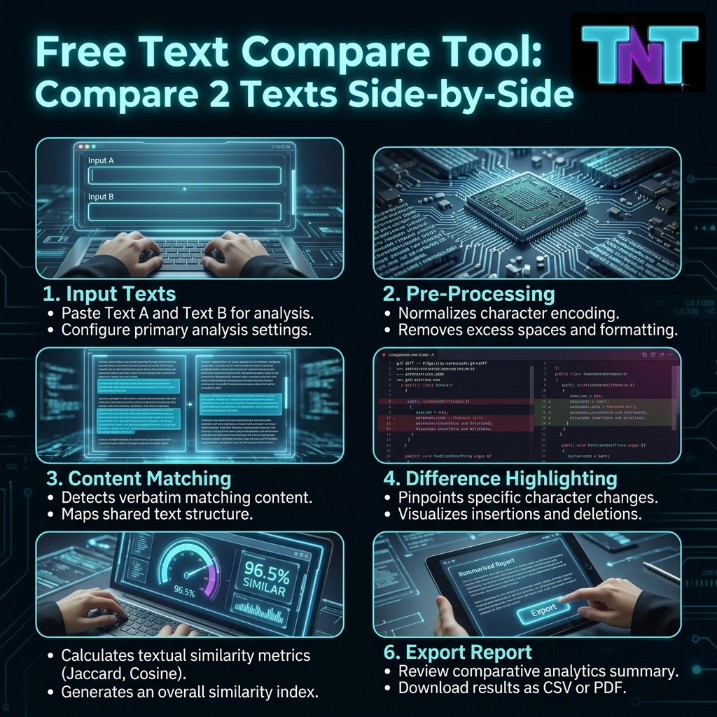
This powerful online text compare tool operates directly within your browser. It uses an advanced sequence-matching algorithm to identify insertions and deletions instantly. By presenting the output with distinct color codes, this text compare helper ensures you never miss a changed word.
- Privacy First: Your documents are processed entirely locally on your device using this free text compare tool. No data is ever sent to a server.
- Color-Coded Precision: Deleted words are marked with purple strikethroughs, while newly added texts are highlighted in bright cyan.
- High Capacity: Perfect for comparing short snippets or multi-paragraph documents. This text compare utility adapts to your needs seamlessly.
Stop straining your eyes comparing files side-by-side on two separate monitors. Experience the speed and accuracy by using this text compare tool tool. Features include a fully responsive design and immediate results. Click the "Load Sample" button above to see the comparison magic in action!
🔄 Free Text Compare Tool: Compare 2 Texts Side-by-Side
Whether you are a programmer reviewing code, a student checking for plagiarism, or an editor verifying document revisions, spotting subtle differences is critical. Welcome to the most reliable online text compare tool designed for speed and accuracy. Exclusively hosted on Tests and Tools, our platform allows you to compare two text snippets effortlessly.
Finding the right software can be challenging, but our free text compare tool operates entirely in your browser. This means your data is secure and never sent to external servers. As noted in Wikipedia's comprehensive guide on Diff utilities, comparing data sets efficiently saves thousands of hours in software development and content editing. When evaluating options, using a robust text compare tool tool interface ensures you don't miss a single altered character.
Try the Live Text Diff Analyzer 🎯
Ready to perform a text compare online? Paste your original content on the left and the modified version on the right. Our interactive text compare helper will analyze the differences instantly.
Why You Need a Text Compare Utility
Manual proofreading is prone to human error. Using our tools enhances your productivity. Here is why an automated text compare utility is indispensable:
| Use Case | Why It Is Important | Benefit |
|---|---|---|
| Coding & Scripts | Finding a missing semicolon or a changed variable name is difficult manually. | Prevents syntax errors and system crashes. |
| Content Editing | Reviewing changes made by co-authors or freelance writers. | Ensures brand voice consistency and tracks revisions. |
| Plagiarism Checks | Identifying similarities between two academic papers or articles. | Maintains originality and SEO integrity. |
| Data Entry | Verifying lists of emails, numbers, or URLs side-by-side. | Guarantees 100% data accuracy. |
The Ultimate Content Review Checklist
Before you finalize your document or publish your code, run through this interactive checklist to ensure perfection. Pair this with our other Text Tools for maximum efficiency:
Frequently Asked Questions
Is this free text compare tool safe for confidential documents?
Absolutely. When you process your text compare online using our platform, the entire comparison happens locally inside your web browser. We do not upload, save, or track your sensitive data on our servers.
Can I compare programming code with this text compare utility?
Yes! Our text compare utility supports all types of text, including HTML, CSS, JavaScript, Python, and plain text. It is highly effective for spotting syntax differences between two versions of a script.
Are there any limits on how many words I can compare?
No, there are no strict word count limits. You can paste thousands of words into the free text compare tool. However, extremely large files may depend on your browser's processing power.