
Advanced Whitespace Remover
Clean, format, and optimize your text with precision.
Mastering Your Text: The Ultimate Guide to Whitespace Optimization
In the digital age, messy data is more than just a visual annoyance; it slows down processing, creates coding errors, and interrupts the natural flow of reading. Whether you are a programmer formatting code, a marketer organizing data, or a prompt engineer fine-tuning AI instructions, a reliable text whitespace remover is an essential part of your digital toolkit.
Microlearning: The Psychology of Clean Text
Why does scattered text feel so exhausting to read? The answer lies in cognitive load. When you remove extra spaces from text, you are not just saving bytes; you are actively optimizing the content for human comprehension.
Clean, well-structured text creates "processing fluency." According to research on cognitive psychology and visual clutter highlighted by Harvard University's Department of Psychology, reducing unnecessary visual noise allows the brain to process information faster. This neurological efficiency triggers a subtle dopamine release, leading to improved speed reading capabilities and significantly higher memory retention. In short, clean text makes you learn and work faster.
How Our Whitespace Remover Online Works
Unlike basic text editors, our online whitespace remover uses advanced regular expressions (Regex) to intelligently parse your content. It does not just blindly delete characters; it understands the context. You can choose to completely trim whitespace online from the edges, or use it as an extra whitespace remover to condense multiple gaps into a single, clean space.
Feature Matrix: Find the Right Tool for Your Task
| Keyword / Capability | What It Does | Best For |
|---|---|---|
| Trim Whitespace Online | Deletes invisible spaces and tabs at the very beginning and end of your lines. | Programmers fixing syntax errors and database administrators. |
| Extra Whitespace Remover | Identifies consecutive spaces (2 or more) and reduces them to a single space. | Writers, editors, and students cleaning up copied PDF text. |
| Remove Extra Spaces from Text | Clears out excessive gaps between words without merging paragraphs. | Content creators structuring blog posts and social media captions. |
| Whitespace Remover Online | The core engine: works entirely in your browser with zero server uploads. | Anyone handling sensitive data requiring 100% privacy. |
Practical Use Cases
- ChatGPT Prompt Optimization: AI models consume "tokens" for every space. Removing excess whitespace saves tokens and generates more accurate AI responses.
- Excel & Data Entry: Prevent formula errors caused by invisible trailing spaces when importing CSV files.
- Code Minification: Use the "Nuclear" option to compress HTML/CSS/JSON by stripping all gaps before deployment.
Creative Ideas & Workflows
- The "Clean Copy" Habit: Make it a habit to paste client briefs through this tool before reading. It reduces your mental fatigue instantly.
- Transcription Cleanup: Audio-to-text tools often leave erratic spacing. Run transcripts through our engine for a polished document.
Crucial Tips for the Perfect Workflow
Always remember to check your specific needs before hitting "Remove ALL." If you are working with Python, indentation matters, so use our dedicated Python mode instead of total removal.
Pro Tip: Text formatting is rarely a one-step process. If your document has deeper structural issues like unwanted line returns or repetitive data, combining our whitespace tool with other specialized utilities yields the best results. For a flawless final product, we highly recommend passing your text through our Line Break Remover to fix broken sentences, and then using the Duplicate Line Remover to ensure your data lists are 100% unique.
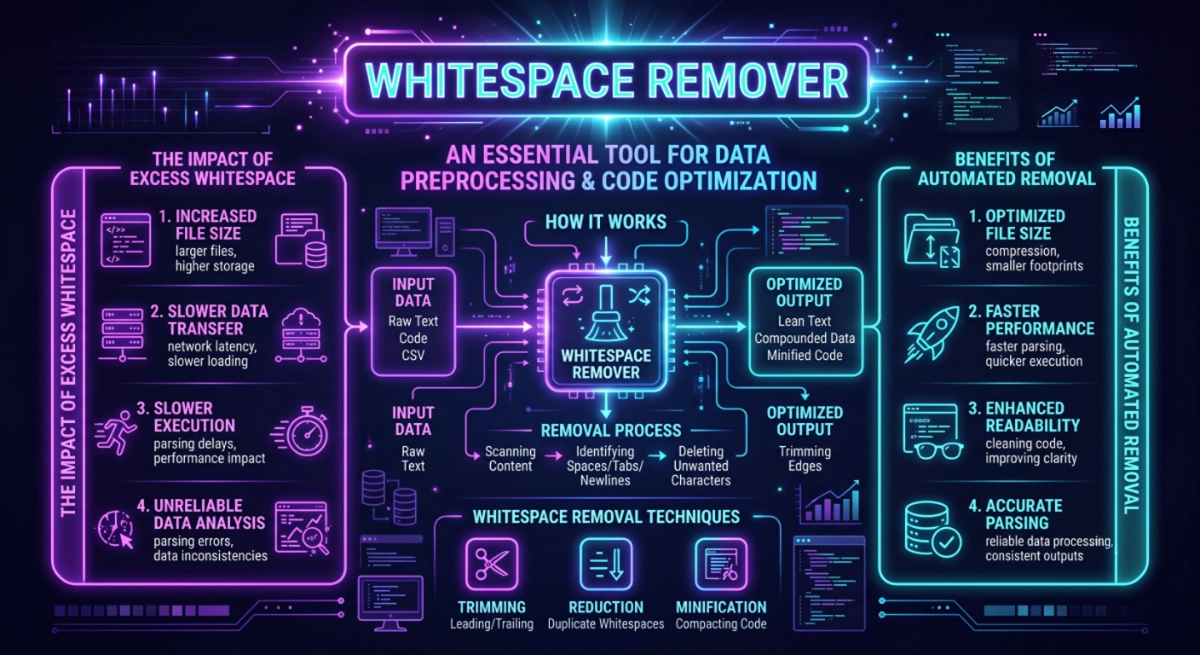
The Ultimate Pre-Publishing Text Checklist
Before you publish your article, paste your code, or send your ChatGPT prompt, make sure you tick these boxes for maximum efficiency:
🧠 The Text-Clarity & Focus Test
How often do you find yourself manually pressing the "backspace" key to fix bad text formatting?
Your Productivity Insight:
Based on data regarding digital habits, manually formatting text disrupts your "flow state" and increases cognitive load. By automating this process with an online whitespace remover, you are not just cleaning text—you are actively protecting your mental focus.
Clean text directly correlates with improved speed reading and better memory retention. Whether you are pasting content into visual builders like Elementor or WordPress, or formatting study notes, automating the cleanup process saves you hours of micro-frustrations every month. You are now officially optimizing your workflow!